ANDROID CHARGING SPEED & BATTERY HEALTH MONITOR • 100% OFFLINE & AD-FREE
Xpand Charging: Volt & Amp
Measure live Android charging speed in Watts (W), electric current in milliamps (mA), and cell voltage (V/mV). Test USB cables and fast chargers, log battery cycles locally, set 80%/100% and temperature alarms, and use AMOLED Night AOD with zero ads or internet access.
App Screenshots
Complete Functions & Capabilities
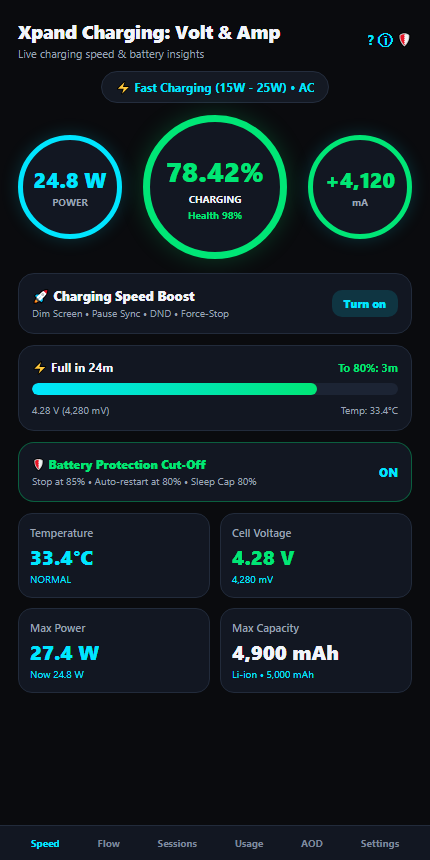
1. Triple Circular Speed Gauges
Displays live Power (W), 2-decimal Battery Level (%) with Health Grade (Excellent/Good/Fair/Poor), and Current (mA). Choose from Modern Arc, Classic Ring, or Segmented Neon styles and toggle primary readouts.
2. Fast Charging & Taper Curve
Classifies Slow (<5W), Standard (5W–10W), Fast (15W–25W), Super Fast (30W–65W), and Ultra Fast Turbo (67W+) speeds across AC, USB, Wireless, and Dock, plus a 10% bracket Power-by-Level chart.
3. Smart 80% & 100% ETA + Alarms
Estimates minutes remaining to 80% and 100% charge with sound & vibration alerts at 80%, 100%, and custom overheat thresholds (36°C–48°C) in °C or °F.
4. Charging Speed Boost & Cut-Off
1-Tap Boost measures before/after mA change, dims screen, pauses background sync, toggles DND, flags slow cables (<7W), and pairs with Basic/Custom (50%–100%) Battery Protection Cut-Off & Sleep Cap.
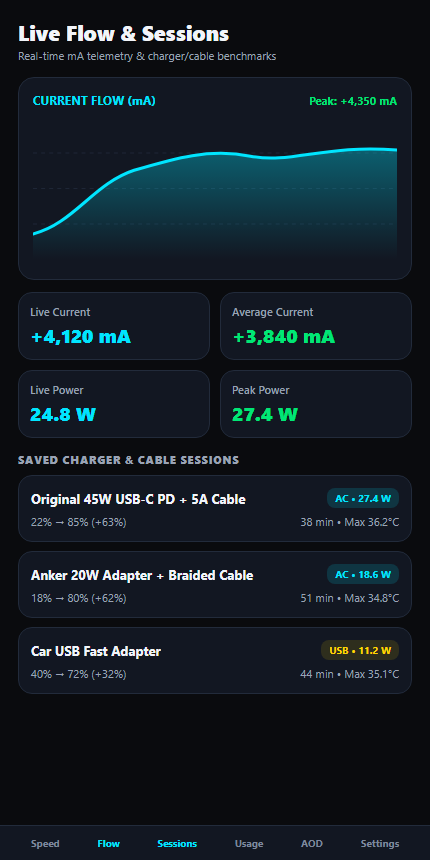
5. Flow Chart & Session History
High-precision live mA line chart plus automatic Room SQLite session logs recording start/end %, duration, peak Watts, avg/max mA, and max temperature — rename sessions to benchmark chargers and cables.
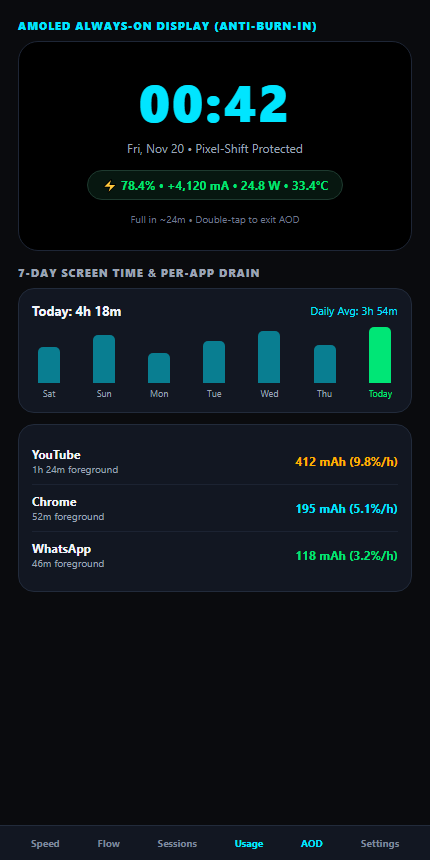
6. AMOLED AOD, Usage & Widgets
Pitch-black Night AOD with anti-burn-in shift and media controls, optional 7-day Usage & per-app mAh/h drain tracker, live status-bar monitor, and 2×1 Compact & 4×2 Boost home-screen widgets.
Technical Specifications & Permissions
| App Name | Xpand Charging: Volt & Amp |
| Package ID | com.xpand.chargingmeter |
| Version | 1.0.0 (Min Android 8.0 / Target Android 16 SDK 36) |
| Network / Ads | Zero ads, zero trackers, no INTERNET permission (100% offline) |
| Optional Permissions | Notifications (live bar & alarms), Usage Access (per-app drain), Modify System Settings & DND (Boost mode) |
Frequently Asked Questions (FAQs)
How does Xpand Charging calculate live Watts (W), Volts (V), and mA?
It reads live hardware values from Android’s BatteryManager APIs (cell voltage in millivolts and electric current in milliamps) and computes instantaneous charging or discharging wattage using P = V × I.
Does Xpand Charging send any battery or app usage data to a server?
No. The app does not request the INTERNET permission at all. Every session log, chart, and app-drain reading remains strictly inside your device’s local Room database and preferences.
How can I compare two chargers or USB-C cables accurately?
Charge your phone for a few minutes with each setup and check the Sessions tab. Each session automatically logs peak Watts, max/average mA, temperature, and % gained, and you can rename sessions (e.g., “Original 45W PD” vs “Car Charger”).
What does AMOLED Night AOD do while charging?
When enabled, it displays a pitch-black (#000000) clock, battery %, live Watts/mA, and optional media controls with periodic pixel-shift burn-in protection, brightness slider, scheduled quiet hours, and double-tap exit.
Are Usage Access and Modify System Settings required to use the app?
No, they are completely optional. Live Watts/Volt/Amp monitoring, Flow charts, Session history, Alarms, AOD, and Widgets work without them. Usage Access only unlocks per-app drain stats, and Modify System Settings / DND only powers Charge Boost screen dimming and Do Not Disturb.